
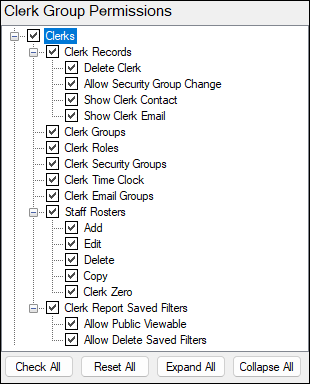
Allows access to the Clerks menu, which is used to access Clerf/Staff related functions including Security (that is, the management of access to Swiftpos functions).
Clerk Group Permissions For Clerks ▲ ▼
- Clerk Records
Allows access to create/maintain/view Clerks/Staff in Swiftpos.
Notes ...
This only applies in those Venues for which authorisation has been granted.
- Clerk Records continued ...
- Delete Clerk
Allows access to delete Clerks/Staff in Swiftpos.
- Delete Clerk
Notes ...
This only applies in those Venues for which authorisation has been granted.
- Clerk Records continued ...
- Allow Security Group Change
Allows access to edit Security Group Permissions in Swiftpos.
- Allow Security Group Change
Notes ...
This only applies in those Venues for which authorisation has been granted.
- Clerk Records continued ...
- Show Clerk Contact
- Show Clerk Email
- Clerk Groups
Allows access to the Clerks Roles menu option. Used to create/maintain Clerk Roles in Swiftpos. Clerk Roles are defined primarily to assign pay rates and track working hours against particular roles. - Clerk Roles
Allows access to the Clerks Roles menu option. Used to create/maintain Clerk Roles in Swiftpos. Clerk Roles are defined primarily to assign pay rates and track working hours against particular roles. - Clerk Security Groups
Allows access to the Clerks Security Groups menu option. Used to manage/setup Clerk Security Groups to control access to Swiftpos Back Office, APIs and Handhelds as well as the determine the hierarchy of users within Swiftpos. - Clerk Time Clock
Allows access to the Clerk Time Clock menu option. Used to review/commit Time Clock entries which have been recorded at Touch terminals.
Notes ...
This only applies in those Venues for which authorisation has been granted.
- Clerk Email Groups
Allows access to the Clerk Email Groups menu option. Used to create/maintain email groups in Swiftpos to support notifications relating to Batch Reports and Purchase Order Authorisations. - Staff Rosters
Allows access to the Staff Rosters menu option. Used to facilitate a basic Staff rostering/management function.- Add
Allows Staff Rosters to be added. - Edit
Allows Staff Rosters to be edited. - Delete
Allows Staff Rosters to be deleted. - Copy
Allows Staff Rosters to be copied to create a new one. - Clerk Zero
Allows Clerk Zero (System Admin) to be rostered.
- Add
- Clerk Report Saved Filters
Allows access to delete/edit/save/view Private/Public Favourite reports within the Reports menu. Refer HERE for more information regarding the options available when this option is selected.
End of article ▲