
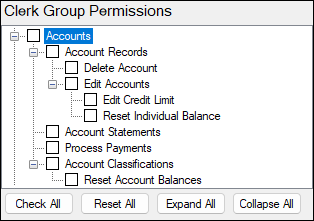
Allows access to the Accounts menu, which is used to manage Customer/Member/Account data and perform account-related processes within SwiftPOS.
These records represent Customers, Members, or Accounts and are used to track balances, transactions, and account activity.
- Access is limited to authorised Venues (Location Groups) only.
- These permissions control both:
- Operational functions (processing payments, statements)
- Administrative actions (editing accounts, resetting balances, classifications)
The Account permissions determine a user’s ability to:
- View and manage account records.
- Edit financial attributes (credit limits, balances).
- Process account transactions and payments.
- Maintain and configure account classifications.
Proper configuration ensures users only have access to financially sensitive operations appropriate to their role.
Clerk Group Permissions For Accounts ▲ ▼
- Account Records
Allows access to search and view Member/Account records assigned to the venue.- Delete Account
Allows deletion of a Member/Account record from SwiftPOS. - Edit Accounts
Allows access to view and edit all attributes of a Member/Account record (Full Edit mode).- Edit Credit Limit
Allows modification of the credit limit assigned to an individual account. - Reset Individual Balance
Allows resetting an individual account balance back to 0.00.
- Edit Credit Limit
- Delete Account
- Account Statements
Allows running statements based on account activity and transactions. - Process Payments
- Allows access to reconcile or process payments against invoices charged to Member/Account cash accounts.
End of article ▲