
This outlines How To Access The Swiftpos Services Monitor Menu in Back Office.
How To? ▲ ▼
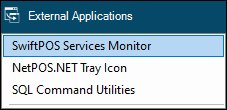
- In Back Office, select the External Applications menu and then select the Swiftpos Services Monitor menu option.
- When selected an icon is created in the system tray as seen below.
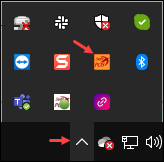
- Click the Show hidden icons up arrow in the system tray and right click the icon to invoke the Swiftpos Services Monitor menu.
End of article ▲